mc.matrix
With the answer type mc.matrix you can arrange your multiple choice problem in a matrix layout.
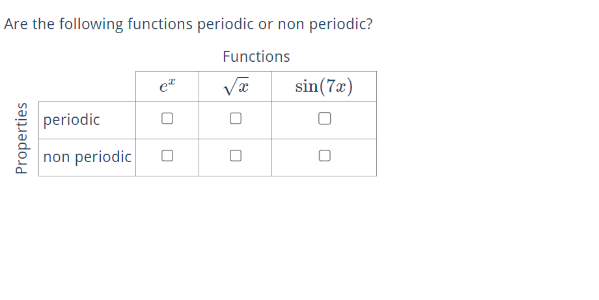
Rows and columns can be permuted. That's optional, as are the title name for rows and the title name for columns.
- \permuterows{min index}{max index}
- \permutecolumns{min index}{max index}
- \rowTitle{row title}
- \columnTitle{column title}
The column labels are defined by the \tasks command. The labels are separated by a semicolon. As usual
you can write TeX, math, use variables and image references as a label.
\tasks{column 1 label; column 2 label; ...} e.g.
\tasks{$e^x$; some text; function $\var{f}$;\image{image lid}}
Each row is defined in its own environment.
\begin{row}
    ...
\end{row}
The row labels are defined by the \text command inside a row environment. As usual you can write TeX, math, use
variables and image references as a label.
\text{row label}
Score
How the MC score is computed and how you can change that.
Example code
(for result see screenshot above)
\begin{question}

    \begin{variables}
        \randint{a}{2}{7}
    \end{variables}

    \type{mc.matrix}
    \text{We are curious:}
    \explanation{Please reconsider your answer}

    \begin{answer}
        \text{Are the following functions periodic or non periodic?}

        \permuterows{1}{2} %optional
        \permutecolumns{1}{3} %optional
        \rowTitle{Properties} %optional
        \columnTitle{Functions} %optional

        % column 1-4 labels
        \tasks{$\sin(\var{a}x)$;$e^x$; $\sqrt{x}$}

        \begin{row}
            % row 1 label
            \text{non periodic}

            \begin{choice}
                \solution{false}
            \end{choice}

            \begin{choice}
                \solution{true}
            \end{choice}

            \begin{choice}
                \solution{true}
            \end{choice}
        \end{row}

        \begin{row}
            % row 2 label
            \text{periodic}

            \begin{choice}
                \solution{true}
            \end{choice}

            \begin{choice}
                \solution{false}
            \end{choice}

            \begin{choice}
                \solution{false}
            \end{choice}
        \end{row}

    \end{answer}

\end{question}